Most people pick a flyer size the wrong way around. They design something they like, then ask the printer what it costs, then find out it does not fit the rack, cannot be mailed at the standard rate, or costs four times what they budgeted because they went big. The size is not a design decision. It is a distribution decision, and it should be the first thing you settle before anyone opens Illustrator or Canva.
This guide covers every standard flyer size with real numbers, then walks through how to match one to your actual campaign. If you already know your size and just want the job produced, our flyer printing service in Markham covers all the sizes below, and if the deadline is tight, rush printing can usually still make it work.
What Is the Standard Flyer Size?
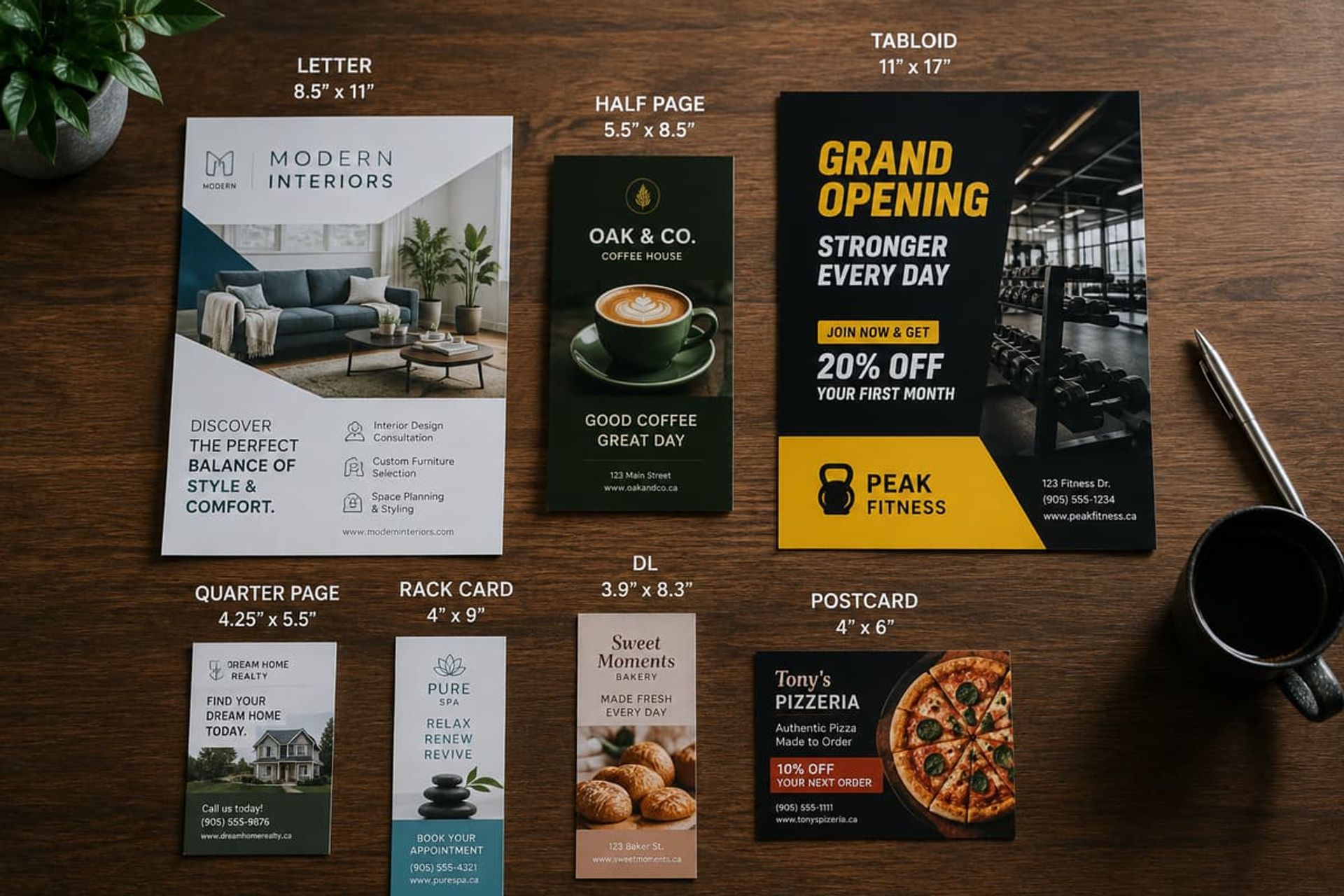
In Canada and the US, the standard flyer size is US Letter, 8.5 x 11 inches (216 x 279 mm). It is the same sheet that sits in every office printer, and it is what any North American print shop will assume if you do not specify anything else.
Internationally the equivalent is A4, 210 x 297 mm (8.27 x 11.69 in). Canada uses Letter, not A4, so unless you are printing for a European or Asian audience, Letter is your default.
That is the answer to the question most people are actually asking. But "standard" only means "the safe default." Half of the flyers we print at our Markham shop are not Letter at all, because Letter is the wrong tool for a street handout or a brochure rack.
Flyer Size Chart: Dimensions in Inches, mm and Pixels
Here is every size worth knowing, with the pixel dimensions at 300 DPI, which is the resolution print requires.
One note on the pixel column: it is there so you can sanity check a file someone sends you, not so you design in pixels. Set your document in inches or millimetres at 300 DPI and the pixels take care of themselves. A graphic pulled off a website at 72 DPI will look perfect on your monitor and visibly soft once it is printed at flyer size, where a blurry logo is far more obvious than it would be on a business card.
Half Page vs Quarter Page Flyers
The reason smaller flyers cost less is not that they use less ink. It is that more of them fit on the press sheet.
A half page flyer is exactly half a Letter sheet, so two print on one sheet and get cut apart. A quarter page is a quarter of a Letter sheet, so four come off the same sheet. Same paper, same press pass, four pieces instead of one. That is where the cost per piece drops, and it drops in steps, not smoothly. Going from 8.5 x 11 down to 8 x 10 saves you almost nothing, because it still takes a full sheet. Going from 8.5 x 11 to 5.5 x 8.5 roughly halves the paper cost per flyer, because the imposition changes.
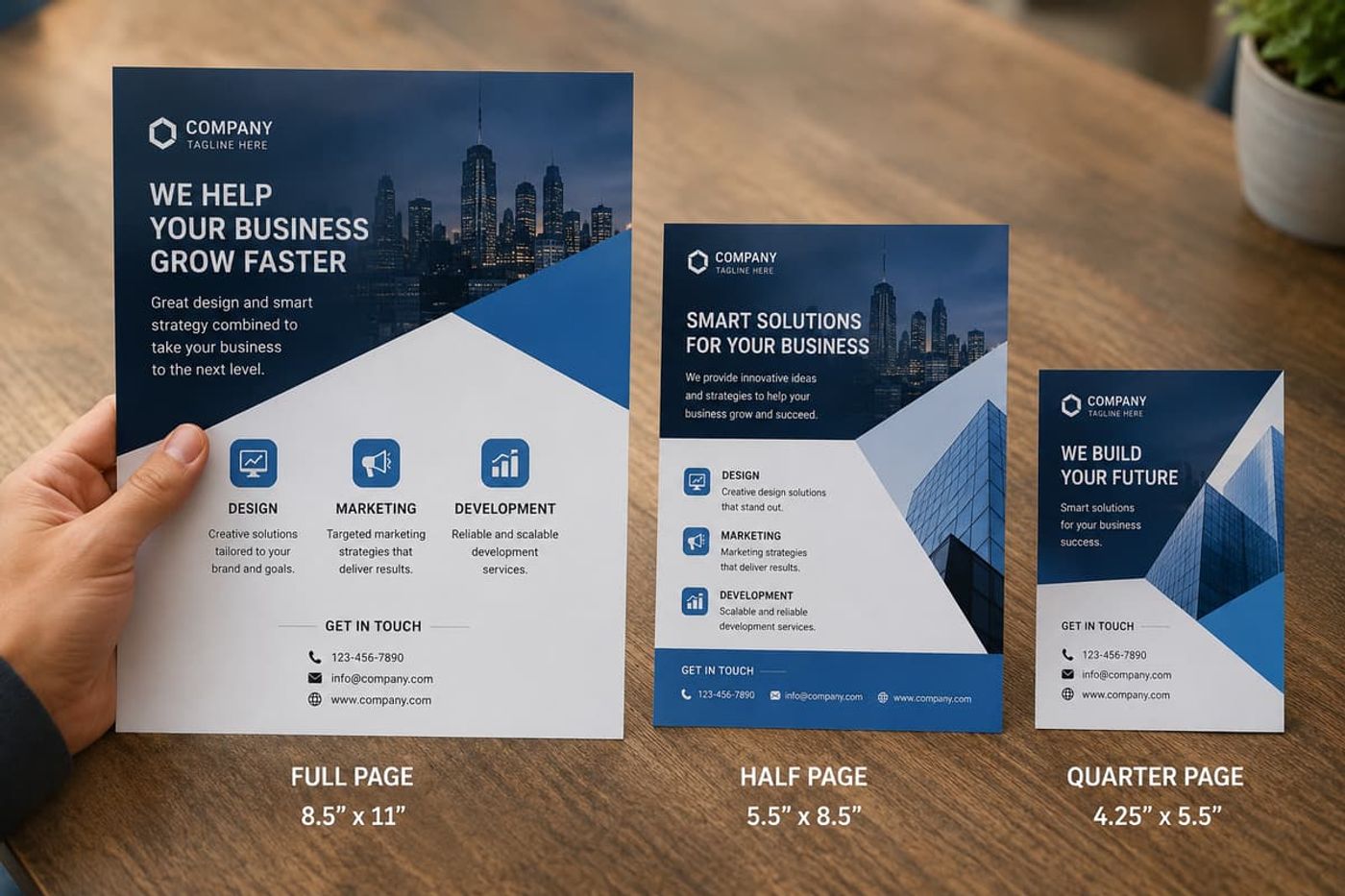
The practical takeaway: if you are trying to cut cost, do not shave an inch off your design. Drop to the next real fraction of the sheet. And if you are not sure which fraction your idea lands on, ask before you design, because we can tell you in about thirty seconds whether your custom size wastes half a sheet.
The second lever is quantity. Setup work on a print job is largely fixed, so the per piece cost falls as the run gets longer. Five hundred flyers are not five times the price of a hundred. If you are running a campaign that will repeat, printing a longer run once is almost always cheaper than three short runs, as long as the offer on the flyer is not going to expire.
A4 vs Letter Flyer Size: Why the Difference Matters More Than It Looks
A4 and Letter look interchangeable. They are not.
A4 is narrower and taller (210 x 297 mm) than Letter (216 x 279 mm). Send an A4 file to a printer expecting Letter and one of two things happens: the file gets scaled to fit, which throws off every margin you set, or it gets placed at actual size and leaves an uneven white band on two edges.
This comes up constantly with files built in Canva or Word by someone using an international template, or artwork inherited from a head office overseas. If your flyer is being printed in Canada, build it at Letter. If it is genuinely going to Europe or Asia, build it at A4 and tell your printer. Do not treat them as the same size and hope the scaling works out.
Which Flyer Size Fits Your Campaign?
Work backwards from how the flyer reaches a person. Everything else follows from that.
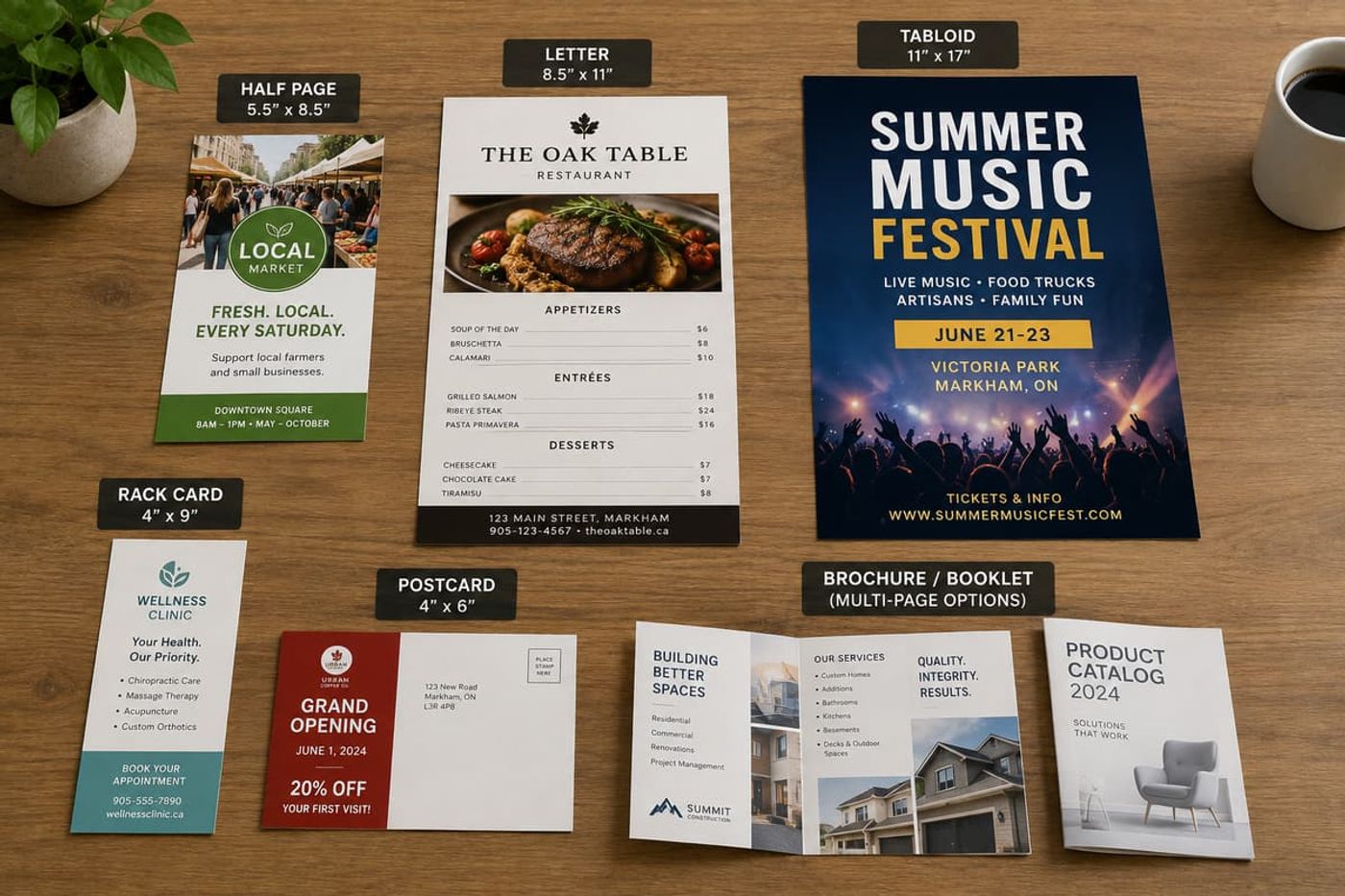
Handed out on the street, at a booth, or at an event. Half page (5.5 x 8.5) or A5. Big enough to read at a glance, cheap enough to print in the thousands, and it fits in a coat pocket without being folded into a ball. This is the workhorse size for anything where reach matters more than depth.
Left on a counter, stuffed in a bag, or pinned to a community board. Letter, 8.5 x 11. You have room for a real explanation, a price list, a map, a menu. It holds its own on a board next to other notices and it stands up in a counter display.
Read from across a room, taped in a window or on a wall. Tabloid, 11 x 17. This is a display piece, not a handout. If somebody has to read your headline from three metres away, Letter will not do it and no amount of bold type will fix that. If you are going this route regularly, poster printing is usually the better format and stock for the job.
Slipped into a brochure rack at a hotel, clinic, or visitor centre. Rack card (4 x 9) or DL. These sizes exist because racks are built to hold them. Measure the actual holder before you commit, because rack depth varies.
Mailed to a list of addresses. A postcard size, and the dimensions are dictated by Canada Post, not by you. See the next section.
Handed to one person in a meeting, alongside other material. Honestly, a flyer may be the wrong piece. If you are presenting several services or a full product range, a folded brochure or a short booklet reads better and does not get treated as disposable. Our brochure printing and booklet printing pages cover the formats.
The mistake we see most is not an exotic dimension. It is a beautiful 8.5 x 11 flyer designed for a counter that the client then decides to mail, or to hand out by the thousand. Both of those are the wrong job for that size, and by the time anyone notices, the file is finished.
Mailing a Flyer in Canada
If your flyer is going in the mail, its dimensions stop being a design choice and become a postage rate.
For Lettermail within Canada, Canada Post sets a minimum of 140 x 90 mm (5.5 x 3.5 inches) for all items, and a maximum standard size of 245 x 156 mm (9.6 x 6.1 inches). Anything larger is treated as oversize or non-standard, costs more in postage, and still cannot exceed 380 x 270 mm (15 x 10.6 inches). For cards going to the US or international destinations, the maximum is smaller again at 235 x 120 mm (9.2 x 4.7 inches).
What this means in practice: a Letter size flyer at 8.5 x 11 inches is well past the standard limit. It will either need an envelope or it will be charged at the oversize rate. A 5 x 7 or 6 x 4 postcard style flyer sits comfortably inside the standard range and mails at the cheaper rate with no envelope at all.
On a run of a few thousand pieces, that difference in postage is usually larger than the entire printing bill. It is worth confirming the current rate with Canada Post before you finalize the size, since rates and classifications change.
Folded Flyer Sizes: Flat Size vs Finished Size
This is where more files go wrong than anywhere else, and most size guides skip it entirely.
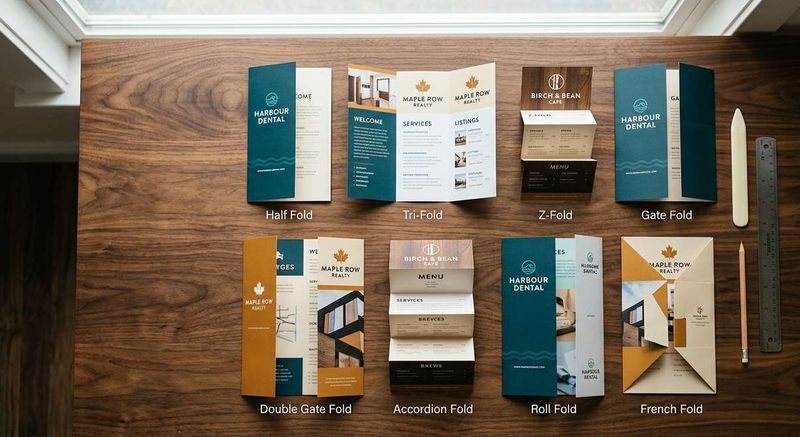
A folded flyer has two sizes. The flat size is the sheet before folding, and it is what you build the document at. The finished size is what the customer holds. A standard tri-fold is flat 8.5 x 11 and finishes at roughly 3.67 x 8.5. A half fold from Letter is flat 8.5 x 11 and finishes at 5.5 x 8.5.
Two things to get right:
Set up the document at flat size, in one spread per side. Do not build three separate panel files. The printer needs the sheet as it will be imposed.
The panels on a tri-fold are not equal. The panel that folds inward has to be slightly narrower, usually by about 1/16 inch, or it buckles against the fold and the piece does not close flat. Software templates often ignore this. Ask your printer for their folding template rather than dividing 11 by three and calling it done.
If you are folding, tell your printer at quote stage, not at file delivery. The fold affects imposition, paper choice, and whether the piece needs scoring, and heavier stock will crack along an unscored fold.
Flyer Bleed and Safe Area
Every print ready flyer has three lines, not one.
Trim is where the flyer gets cut. For a Letter flyer that is 8.5 x 11 in.
Bleed is background that extends past the trim so the cut never exposes white paper. The standard is 0.125 in (about 3 mm) on all four sides, which makes a full bleed Letter flyer 8.75 x 11.25 in. A full bleed A4 is 216 x 303 mm.
Safe area is the inner margin where all text and logos must stay, usually 0.125 to 0.25 in inside the trim.
The reason both exist is mechanical. Industrial cutters slice through tall stacks at once and drift by up to about a millimetre. Bleed means that drift exposes a little more of your background instead of bare white. Safe area means the same drift never reaches your phone number.
Before you export, run through this:
- Document at trim size with 0.125 in bleed on all sides
- All text and logos inside the safe area
- CMYK colour, not RGB
- Images at 300 DPI at final size, not upscaled
- Fonts embedded or converted to outlines
- Export as PDF with bleed and crop marks
- Double sided flyer sent as two print ready pages, same margins on both
If you are working in Canva or Word, note that Word has no bleed setting at all. The workaround is to build a custom page size that already includes the bleed and extend your artwork to the new edge. In Canva, choose the PDF Print download option rather than PDF Standard.
Common Flyer Size Mistakes That Cause a Reprint
Designing at screen resolution. A 72 DPI image looks fine on your monitor and soft on paper. Design at 300 DPI at final physical size.
Building in RGB. Screen colour and press colour are different systems. Bright RGB blues and greens print noticeably duller. Set CMYK at the start, not after the design is finished.
Text right up against the trim. A millimetre of normal cutting drift is enough to slice through it. This is the single most common cause of a flyer coming back wrong.
Picking the size before the distribution method. Covered above, but it is the expensive one, because it is not caught at preflight. It is caught when the flyers arrive and do not fit the rack.
Assuming a custom size is free. Odd sizes can waste half a press sheet. If your size is not a clean fraction of a standard sheet, ask what it costs before you commit.
Not Sure Which Size Fits Your Campaign?
Tell us how the flyer is being handed out and roughly how many you need, and we will tell you which size makes sense and what it costs, before you spend time on design. We have been printing for Markham businesses for over thirty years and we have seen most of the ways a flyer can go wrong.
Request a quote, or browse our full range of printing services if the project has grown past a single flyer. If you are also sorting out paper choices for other pieces, our guide to choosing a business card paper stock covers the same weight and finish decisions from the other end.